


Source MCP is live: drive more growth with attribution-fed agents
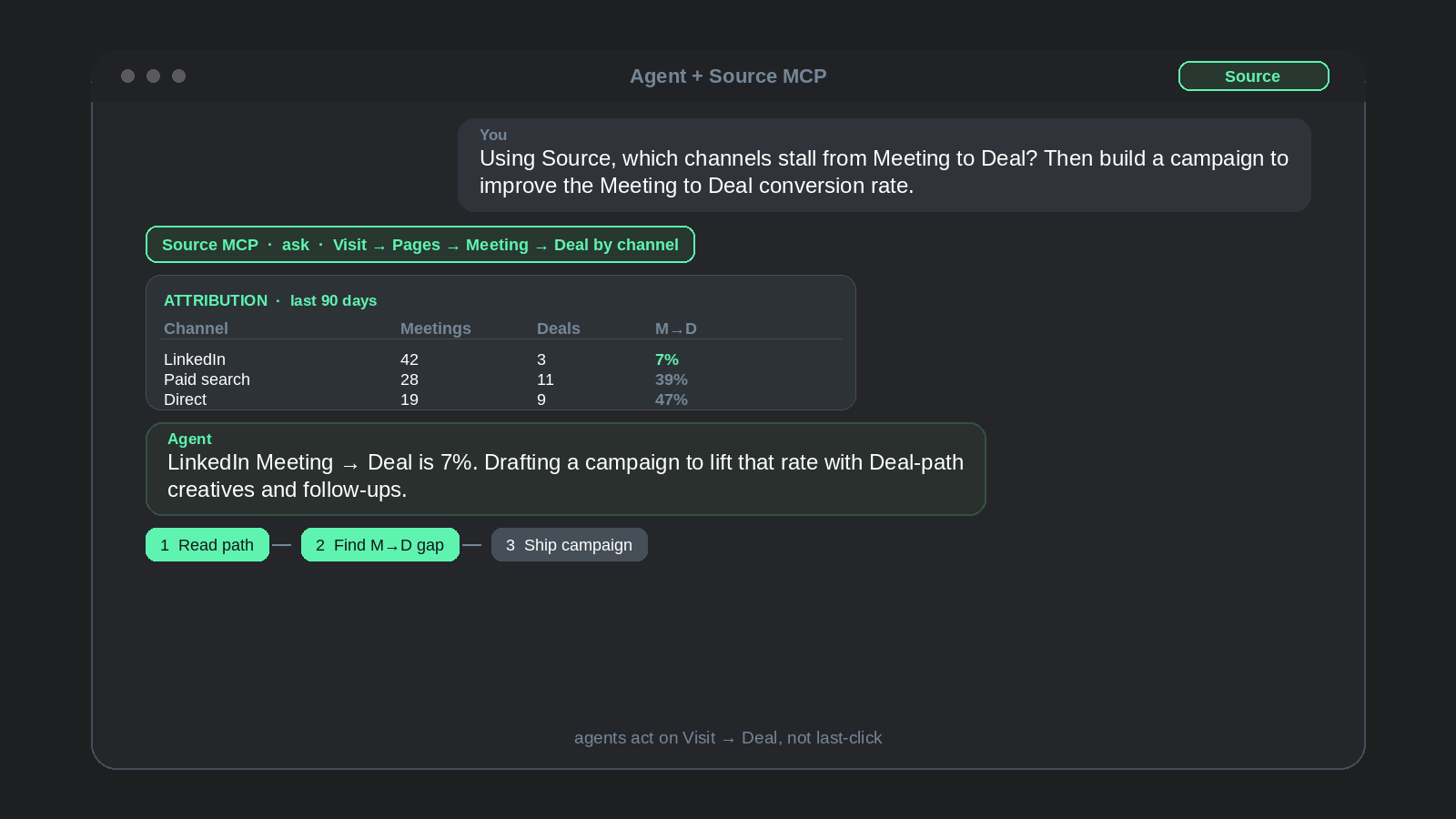
Source MCP is live in production. Connect Claude, Cursor, VS Code, Claude Desktop, Grok, or another MCP client to the same Visit → Pages → Meeting → Deal ledger your dashboard already uses. Your agents can read real attribution, automate marketing workflows, and help you spend toward pipeline and revenue instead of last-click guesses.
The benefit is simple. When attribution data feeds the agents you already use, they do not stop at a chart. They can build the next landing page, spin up or reshape ad campaigns, and push CRM-aware follow-ups from the channels and paths that actually create Meetings and Deals.
Why this matters for growth and revenue
Most teams already trust an assistant for drafts, research, and ops. Attribution usually stays trapped in a tab. That gap costs growth. Budget decisions wait on someone who can export. Weekly reviews repeat the same clicks. Agents that could pause bad spend, launch a winning campaign, or ship a page that converts never see the numbers that protect CAC and grow revenue.
Source MCP closes that gap. Your AI client can:
- Pull cost per conversion, visits, and conversions by channel without leaving the chat
- Follow up in the same thread ("now break that down by campaign, just for paid search")
- Use
askfor plain-English answers with the SQL that produced them, so numbers stay checkable - Use
describe_dataandrun_sqlwhen you want the schema or a tighter query - List websites with
list_websiteswhen you manage more than one property
Source stays the read-only attribution feed. Your agent uses that truth in the tools it already has (site builder, ads platforms, CRM, Slack) to ship the work that grows pipeline.
That is the growth loop: feed Visit → Meeting → Deal into the agent, then let it act. Build pages, create campaigns, and update go-to-market from channel and CRM truth instead of last-click folklore.
Many teams still optimize for Marketing Qualified Leads (MQLs). Lead volume can look healthy while Visit → Meeting → Deal stalls. Source MCP lets an agent read past MQL volume to Meeting and Deal conversion on that path, then act: reshape campaigns, ship pages, and update CRM follow-ups from conversion truth instead of from lead count alone.
What agents can do with attribution + your stack
- Build landing pages from paths that close. With your CRM connected in Source, ask which pages and offers sit on Visit → Meeting → Deal paths that won revenue. Have the agent draft or ship a new landing page (or a variant) aimed at that segment, messaging, and channel, instead of guessing from vanity traffic.
- Create and reshape ad campaigns. Pull cost per conversion and conversions by channel and campaign. Have the agent propose or create campaigns, ad groups, and creatives that mirror the winners, pause losers, and write the change log for the media buyer.
- Read past MQL volume to pipeline. Ask which channels and campaigns mint MQLs that never become Meetings or Deals. Have the agent cut or rewrite the work that fills the lead bucket without moving Visit → Meeting → Deal.
- CRM-backed follow-ups and lists. Use closed Deals and booked Meetings on the path to build lookalike audiences, enrichment notes, or outbound sequences aimed at the accounts and segments that already convert.
- Weekly channel triage. Ask for cost per conversion by channel over the last 90 days, flag channels above your CAC target, and draft the reallocation note for paid search vs. social.
- Content that closes. Ask which pages sit on paths that book Meetings or close Deals, then queue Growth Journal topics, SEO fixes, and page rewrites from that list.
- Sales-assisted truth. Pull Visit → Meeting → Deal for a closed Opportunity so marketing and sales argue from the same path, not from whoever touched the CRM last.
- Board or exec pack. Assemble a short narrative with the queries attached, so every growth claim is reproducible.
Marketers still get Visit → Meeting → Deal in one place in the Source dashboard. Agents get the same ledger over MCP, then do the shipping work in your other tools. Same path, faster loop from question to revenue.
Create a key and connect a client
In the dashboard, open Settings → API keys, create a key, and copy it. It is only shown once.
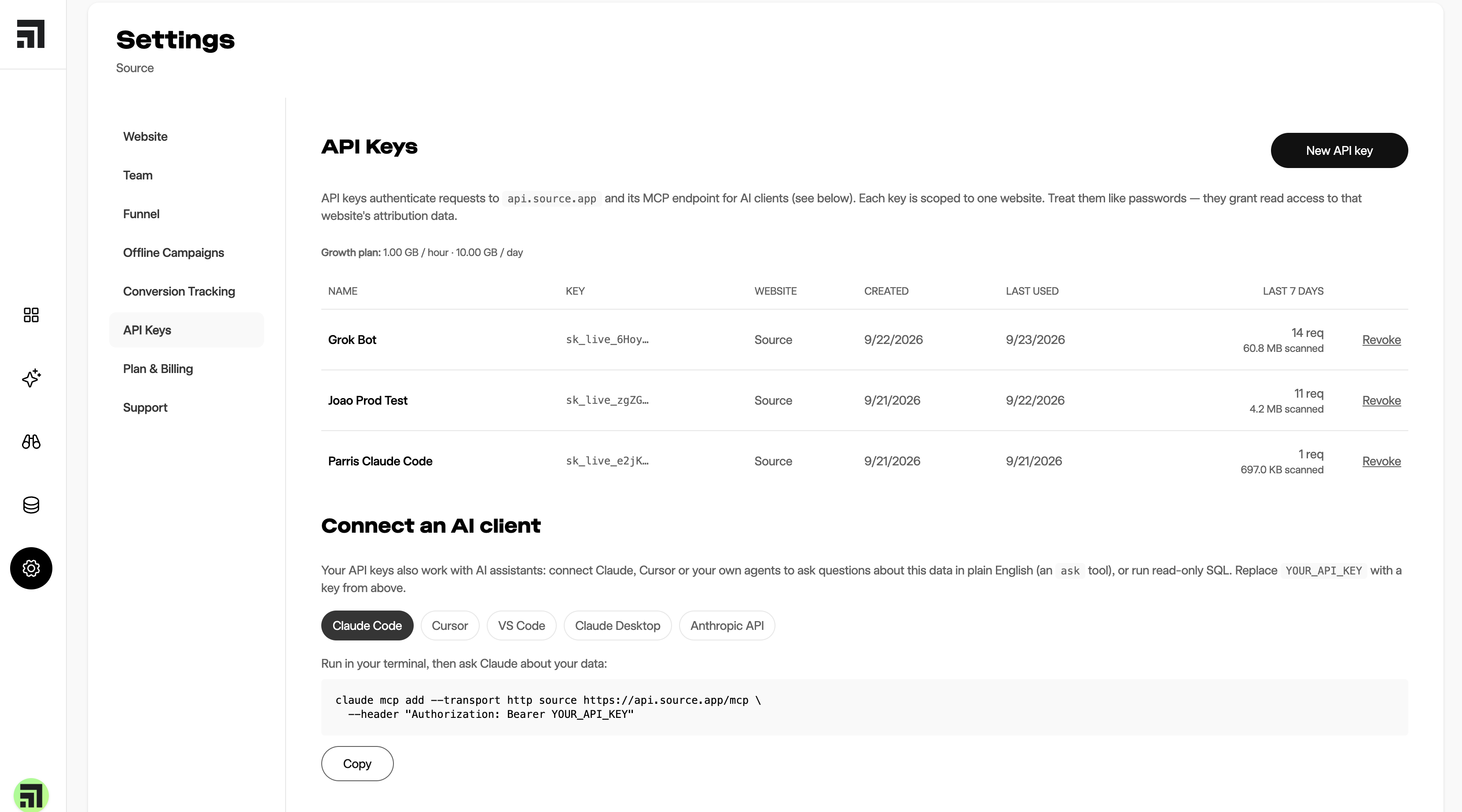
Keys authenticate requests to api.source.app and the MCP endpoint. Each key is scoped to a website and grants read access to attribution data. Nothing an assistant does can change or delete your data.
On the same page, the Connect an AI client panel has a snippet for each supported client. Swap YOUR_API_KEY (or YOUR_KEY) with the real key.
Claude Code
claude mcp add --scope user --transport http source https://api.source.app/mcp --header Authorization: Bearer YOUR_KEYGrok / Grok Bot
CLI:
grok mcp add --transport http source https://api.source.app/mcp --header Authorization: Bearer YOUR_KEYOr in the product: grok.com → Connectors → New Connector → Custom, with the same URL (https://api.source.app/mcp) and header (Authorization: Bearer YOUR_KEY).
Cursor, VS Code, Claude Desktop, Anthropic API
Use the matching tab under Connect an AI client on the API keys page. Each tab shows the config for that environment. The endpoint is always https://api.source.app/mcp with a Bearer API key.
After you connect, start a fresh session. You should see four tools: ask, describe_data, run_sql, and list_websites.
Try:
- Using Source, how many visits did we get last month by channel?
- Using Source, what was our cost per conversion by channel over the last 90 days?
- Then in the same thread: Now break that down by campaign, just for paid search.
Prefer ask for most questions. It returns a written answer, the SQL, the result table, and suggested follow-ups. Pass the conversation id from a previous result when you want a follow-up.
What is deliberate about Source MCP
Read-only. Assistants can query. They cannot write or delete.
Scoped per website. A connected client sees only the site you granted. One key per website today.
Answers include the query. You can check the number instead of trusting a fluent paragraph.
Same path as the product. MCP sits on Visit → Pages → Meeting → Deal, not a separate warehouse story. A faster interface does not fix a path that was never joined. Source keeps that path in one place with one pixel and GTM so the agent and the marketer read the same ledger.
One-click sign-in (OAuth) is coming next, so you will not need to handle keys for everyday connect. Until then, API keys from Settings are the path.
FAQ
What is MCP?
Model Context Protocol. It is an open standard for connecting AI clients to a system that holds data. The client asks what tools and tables it can use, runs a query, and answers in plain language. No CSV export and no ticket to the data team for a one-off question.
Is MCP an attribution method?
No. MCP is how you reach the data. Attribution is whether Visit, Pages, Meeting, and Deal sit on one path so CAC and channel quality stay honest.
Does chatting with my data replace the Source dashboard?
No. Chat is better for one-off and follow-up questions, and for wiring answers into agent workflows. Dashboards are better for the numbers you check on a schedule. Use both.
Which AI clients work?
Any client that speaks MCP. Source documents Claude Code, Cursor, VS Code, Claude Desktop, Anthropic API, and Grok. The same server URL works across them.
Can an AI client change my Source data?
No. Access is read-only and scoped to the websites you choose.
What tools does Source MCP expose?ask (plain English, preferred), describe_data, run_sql, and list_websites.
Do I need a warehouse?
No. Source MCP reads the same path the dashboard uses. Connect ads, CRM, and calendar in Source as you already do for attribution.
How do I get started?
Create a free account at dash.source.app/signup, connect your site, open Settings → API keys, create a key, and paste the client snippet for Claude, Cursor, Grok, or whichever assistant your team already uses.
Source is the attribution data layer for agents and marketers. Connect Source MCP so your agents can read attribution data, automate marketing workflows, and drive more growth and revenue. Marketers still get Visit → Meeting → Deal in one place.
More on source.app · Help: help.source.app · MCP endpoint: https://api.source.app/mcp