


A website redesign checklist that keeps B2B attribution intact

A website redesign keeps your attribution intact only if every old URL redirects with its query string, the tracking pixel loads on every new template, and every form still writes the same fields to your CRM. Miss one of those and the new site looks great while signups drift into Direct, ad platforms stop counting conversions, and next quarter's channel report loses a month of pipeline.
Most of this is preventable with a short checklist that marketing owns alongside the web team. Here it is, in the order you would work through it.
Why does a website redesign break attribution?
A relaunch changes the pieces that attribution depends on, often all at once. URLs move, templates get rebuilt, forms are replaced, and the thank-you page gets a new address. Each change is small. Together they cut the buyer's path in places nobody is watching on launch day.
The damage usually shows up weeks later. Direct traffic jumps, a paid channel looks like it stopped working, or a batch of new contacts arrives in the CRM with no source at all. By then the cause is hard to trace, and the missing touches cannot be recovered.
What should you check before launch?
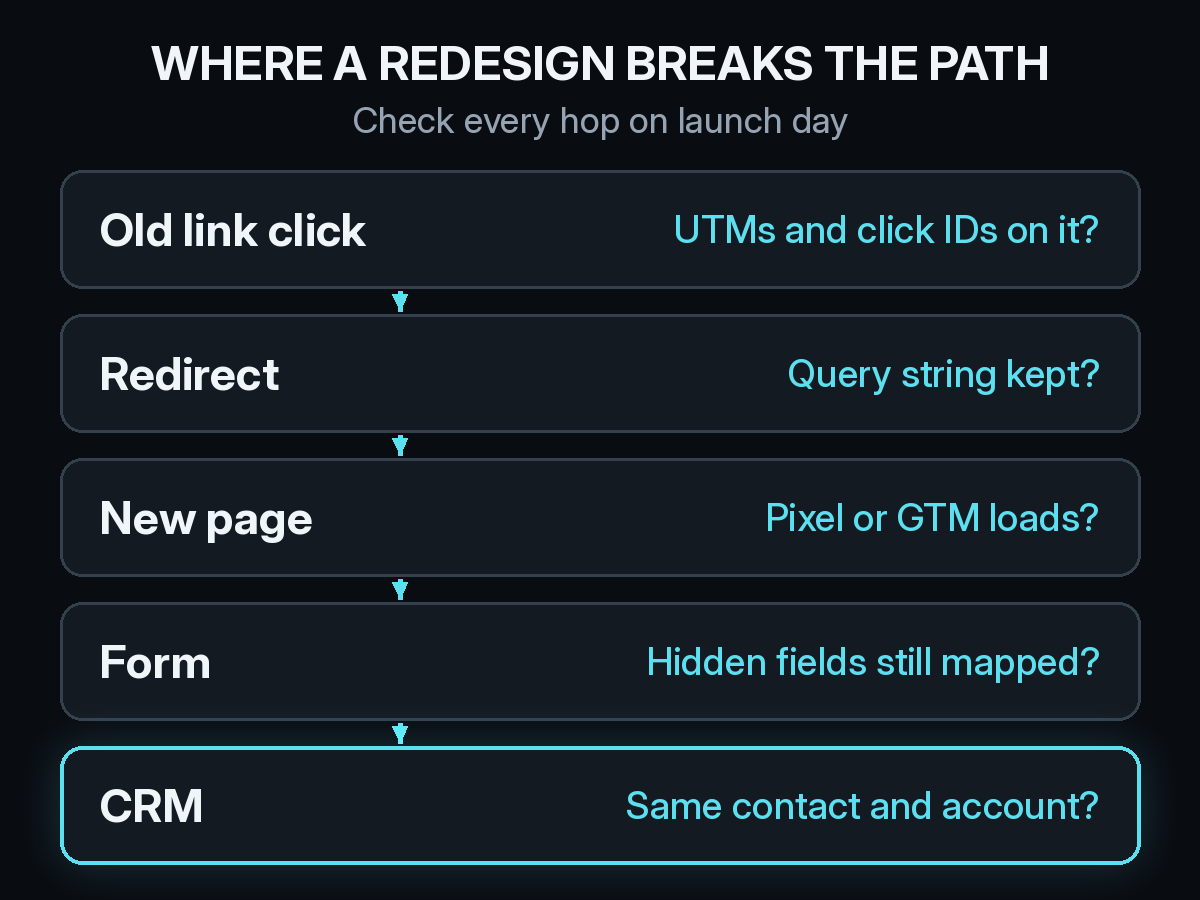
Map every old URL to a new one. Export the URLs that get traffic or carry links today: blog posts, landing pages, pricing, the demo page, and any vanity URLs used in print or at events. Give each one a permanent redirect to its closest new page, not to the homepage. Paid ad final URLs, email templates, and partner links should point straight at the new address, so they skip the redirect entirely.
List every tag, form, and thank-you page. Write down where the tracking pixel or Google Tag Manager container loads, which pages hold forms, which hidden fields each form passes, and which URLs or events your ad platforms treat as a conversion. Include the places that sit outside the main site, such as docs, a signup subdomain, or standalone campaign pages. The new templates need to match that list, line by line.
Keep form field names stable. If the new form tool renames the hidden UTM fields, the CRM mapping breaks without an error. Your CRM hygiene work, like the rules in CRM hygiene that keeps B2B attribution trustworthy, only holds if the fields feeding it stay the same.
Do redirects strip UTM parameters?
Some do. Many server redirects pass the query string through, but redirect rules written by hand, plugin defaults, and locale redirects can drop everything after the question mark. When that happens, a click from a tagged campaign link arrives with no UTMs, and so do Google Ads click IDs like gclid, which means the ad platform stops matching conversions to clicks.
Redirects done in JavaScript or with a meta refresh carry another risk. The original referrer can be replaced by your own old page, so a visit from a partner site looks like it came from you. Use server-side permanent redirects where you can, and test the ones you cannot change. Our list of UTM mistakes that send B2B deals to Direct covers the other places tags disappear.
What should you test on launch day?
Click a tagged link end to end. Take a real campaign link with UTMs, open it in a clean browser, follow every redirect, and confirm the final URL still carries the tags. Do the same with an old blog URL and a vanity URL.
Send a test signup to the CRM. Fill in the demo or signup form as a test contact and check the record in HubSpot or whichever CRM you use. The source fields should be filled, the contact should sit on the right account, and the conversion should show up in each ad platform that relies on it.
If you changed your cookie banner as part of the redesign, check that tags still fire once a visitor accepts. Our guide on how cookie consent changes marketing attribution explains what a stricter banner removes from the path.

What should you watch in the weeks after launch?
Mark the launch date on every attribution report, so anyone reading the numbers later knows where the site changed. Then watch three things for at least two weeks.
First, Direct traffic and signups with no source. A sudden rise after launch usually points to a broken redirect or a form that lost its hidden fields. The patterns in B2B attribution myths that inflate Direct traffic help you separate a tracking break from real word of mouth.
Second, pages that return a 404. The Pages report in Google Search Console lists URLs Google can no longer find, which is a quick way to spot old links you missed in the redirect map.
Third, visits from AI answers. ChatGPT, Claude, Perplexity, and Gemini can keep citing your old URLs for a while. If those links redirect cleanly, that traffic still lands and still counts. Our piece on tracking traffic from ChatGPT and other LLMs covers how to read it.
Does moving to a new domain reset attribution?
Partly. Tracking cookies are tied to the domain that set them, so a returning visitor on the new domain looks like a new one until they fill in a form or log in. Their earlier visits are not lost, but they only reconnect once that person identifies themselves again.
Plan for a short dip in returning visitors and longer paths that look shorter than they are. Identity resolution helps here, because it links the anonymous visits on both domains to the same contact once they convert. We explain how that works in how identity resolution connects anonymous visits to B2B pipeline.
How Source fits into a relaunch
Source installs with one pixel or Google Tag Manager, with no data warehouse to build, so adding it to new templates is the same task as moving any other tag. It records every visit with its UTM tags and referrer, which makes a missing tag easy to see in the days after launch. Multi-touch, view-through, offline, and LLM attribution keep every kind of touch on the same buyer path, before and after the switch.
You can chat with your data to ask whether Direct signups rose after launch, get AI recommendations, and receive daily Slack reports that make a drop visible the next morning. Real CAC, goals, and channel quality stay comparable across the old site and the new one. Source is SOC 2 Type II and ISO 27001 certified, and customer data is not used to train external models.
If a redesign is on your roadmap, start free at dash.source.app/signup and get the path recorded before the switch, so you have a clean baseline to compare against.