


How to send B2B pipeline back to Google Ads with offline conversions

An offline conversion import sends what happens in your CRM after a lead form back to Google Ads, so the platform can see which clicks became qualified pipeline and closed deals. For a B2B team this matters more than any bid setting. Without it, Google optimizes for form fills, and a form fill from a student or a competitor counts the same as one from a buyer with budget. This guide walks through the setup step by step, which stages to send, and how to check that the loop is working.
Why does Google Ads need your CRM data in B2B?
Because the conversion Google can see on its own happens weeks or months before the one you care about. A buyer clicks a search ad, fills out a demo form, and then the real work starts in sales. By the time the deal closes, the ad platform has long since recorded a single conversion and moved on.
Smart bidding learns from whatever you tell it is a conversion. If that is every form fill, it will find you more cheap form fills. That is how teams end up with a falling cost per lead and a flat pipeline, a pattern we covered in why cost per lead misleads B2B paid ads. Feeding CRM stages back gives bidding a target that looks like revenue.
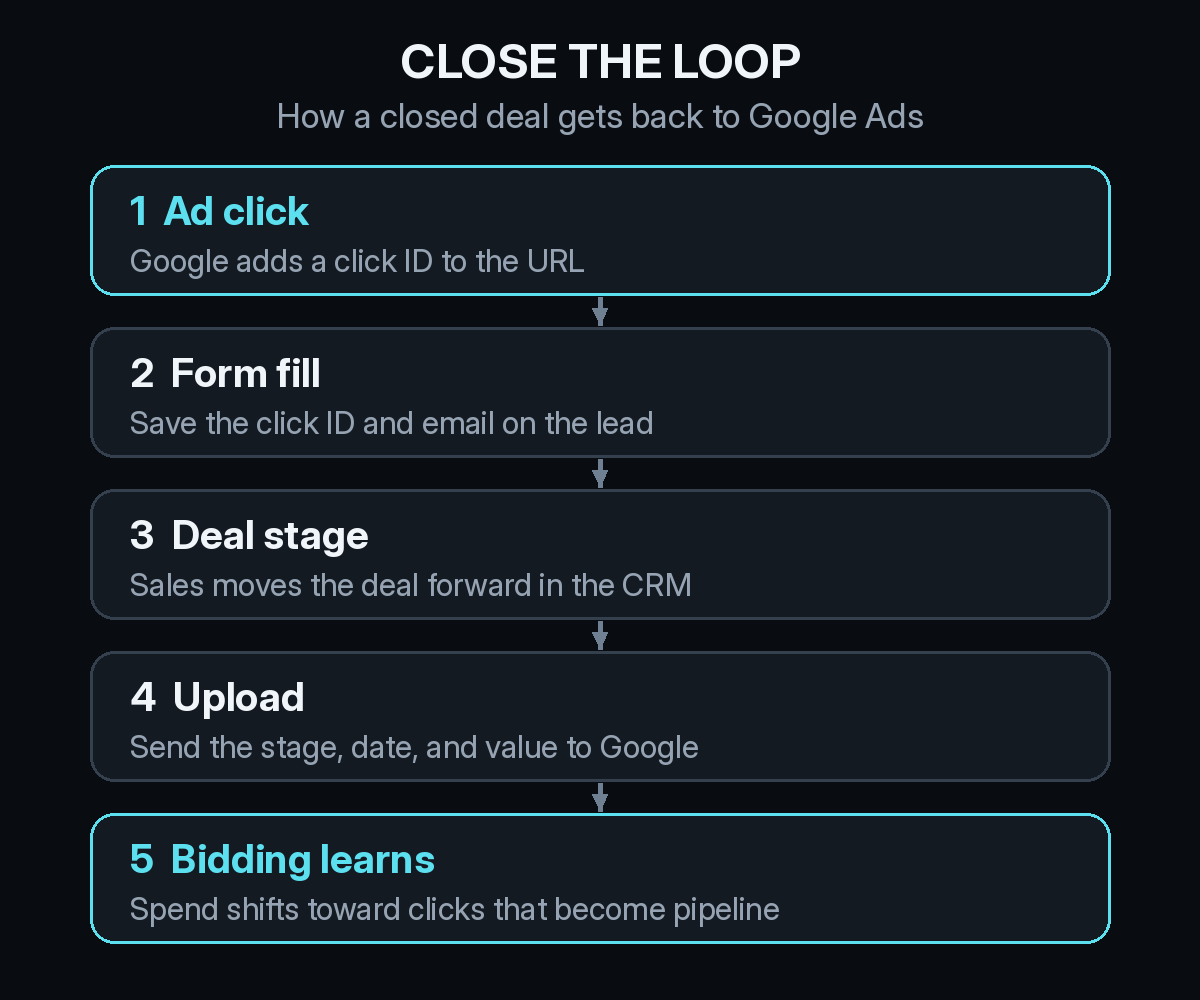
How do you set up an offline conversion import, step by step?
The details depend on your CRM and form tool, but the order is the same for nearly every B2B setup.
1. Keep the click ID on the landing page
When someone clicks a Google ad, Google adds a click identifier called the GCLID to the landing page URL. Turn on auto-tagging in Google Ads so it is always there. Then check that nothing strips it: redirects, cookie banners, and single-page apps sometimes drop query strings before your form ever loads.
2. Save the click ID and email on the lead
Your form needs to capture the GCLID into a hidden field and write it to the contact record in your CRM. Store the email address too. Google now recommends enhanced conversions for leads, which matches on hashed first-party data such as email alongside or instead of the GCLID. That helps when the buyer clicked on a phone and filled out the form later on a laptop.
3. Define the CRM stages you will send
Create a separate conversion action in Google Ads for each stage, with names that match your CRM, such as "Qualified lead" and "Opportunity". Write down exactly what moves a record into each stage. If the definition changes every quarter, the platform keeps learning a different target.
4. Send the stage, date, and value back to Google
When a record reaches a stage, send Google the click ID or hashed email, the conversion action name, the time it happened, and a value if you have one. You can do this with a scheduled file upload, a native CRM integration such as the one in HubSpot, or the Google Ads data tools. Google's own help center notes that offline conversion and enhanced conversions for leads uploads are moving to its Data Manager API, so check the current method before you build a custom pipe.
5. Point bidding at the stage that matters
Once a few weeks of stage data have come through, set the deeper stage as a primary conversion for your bid strategy and keep form fills as secondary. Do not switch the day you launch the import. Bidding needs enough volume at the new stage to learn from.
Which CRM stages should you send to Google Ads?
Send more than one. The stage closest to revenue is the most honest signal, but in most B2B accounts it is too rare and too slow for bidding to learn from on its own.
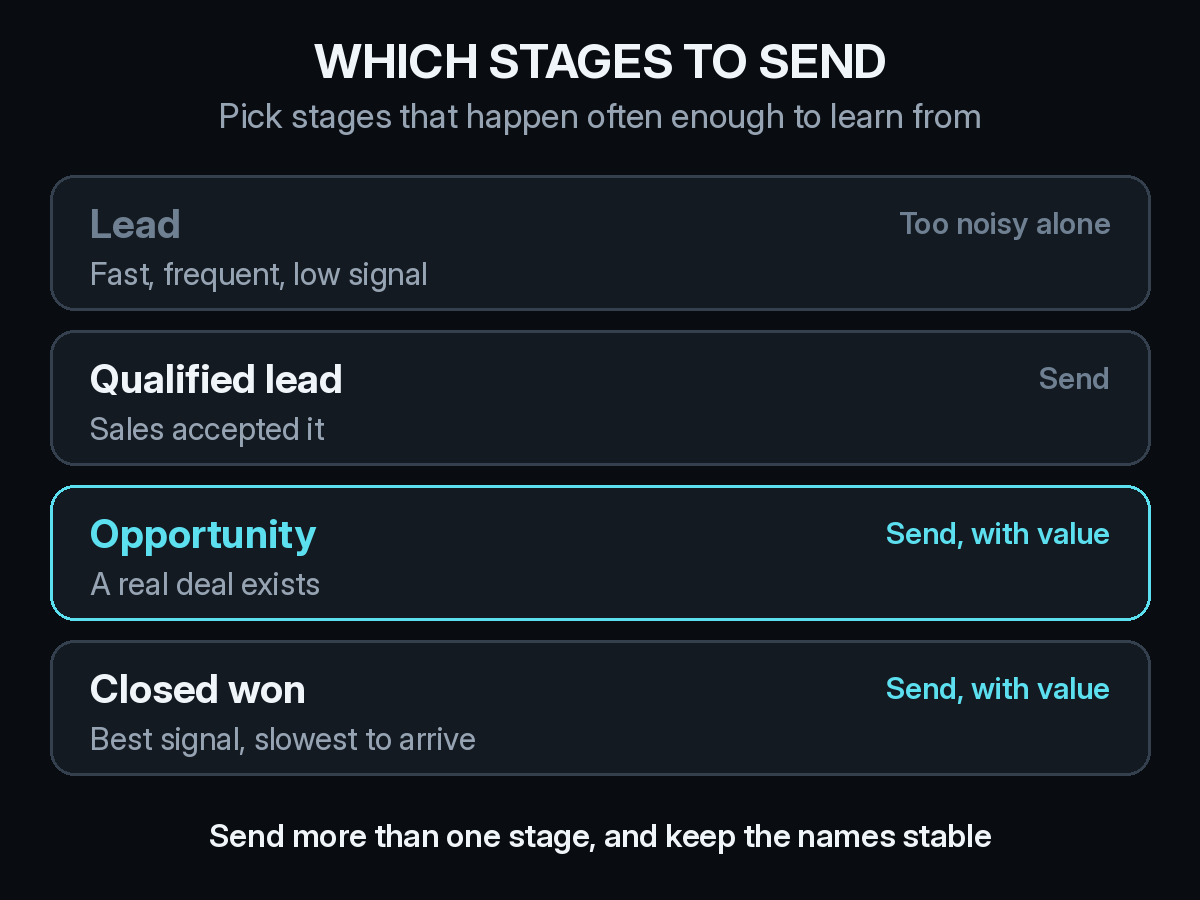
A common pattern is to send qualified leads for volume and opportunities with a value for quality. Closed won goes along too, mostly so reporting inside Google Ads stops ending at the form. Raw leads can stay as a secondary conversion so you still see them without letting them drive bids.
If your values are rough, use them anyway. A fixed value per opportunity is better than no value. If you sell several plans, a value based on the expected contract size tells bidding that one demo is worth more than another.
What goes wrong with offline conversion imports?
- The click ID never reaches the CRM. This is the most common failure. Submit a test form from a real ad click and look for the GCLID on the contact before you trust any upload.
- Stages get skipped. If sales jumps a deal straight from lead to closed won, the middle conversion never fires. Clean CRM stage data is part of the ad setup, not a separate project.
- Uploads stop quietly. A scheduled import fails, nobody checks, and bidding drifts back toward cheap leads. Look at the upload diagnostics in Google Ads every week.
- The numbers still do not match. Google will report imported conversions using its own click-based rules, so they will not line up exactly with your CRM or your attribution tool. We explain why in why attribution numbers do not match across GA4, ads, and CRM.
Does an offline conversion import replace attribution?
No. It answers a narrower question: which Google clicks turned into pipeline, as Google sees it. It cannot tell you that the same buyer first heard about you on a podcast, came back through a LinkedIn ad, and then searched your brand name before clicking the search ad. Every ad platform you feed this way will claim the deal as its own.
So use the import to make bidding smarter, and use attribution to decide budget across channels. The two work well together, and the checks for Google Ads conversions against real pipeline still apply after the import is live. The same idea extends to view-through credit, LLM referrals from tools like ChatGPT, and real CAC by channel, which no single ad platform can report for you.
How Source fits with your Google Ads import
Source installs with one pixel through Google Tag Manager, with no warehouse to build. It follows each visitor from the first ad click or visit through form fills and into the opportunity in your CRM, so you can see the full path behind every deal, including the touches Google never sees. Multi-touch, view-through, offline, and LLM attribution from ChatGPT, Claude, Perplexity, and Gemini sit on that same path.
That gives you a second view to check the import against. If Google says search drove an opportunity and Source shows the account first arrived through a partner, you know how much of that credit to trust. You can chat with your data, get AI recommendations, track real CAC and channel quality, and get a daily Slack report. Source is SOC 2 Type II and ISO 27001 certified, and customer data is not used to train external models.
If you are about to set up your first offline conversion import, start free at dash.source.app/signup and get the deal path in place first, so you can see whether the new bidding target actually brings in better pipeline.