


Why AI marketing agents need attribution data before they act
An AI marketing agent is only as good as the data it can read. Point one at ad platform dashboards and it will repeat each platform's version of the truth, just faster. Give it attribution data that ties visits, spend, meetings, and deals to the same account, and it can answer the questions that actually move budget. That is why we think attribution data has to come before any agent touches your growth work.
This is our point of view on what agents need, where they go wrong, and how to set them up so their answers hold up in a pipeline review.
What goes wrong when an agent reads platform data?
Most teams start by connecting an agent to the tools they already have: the ad accounts, the analytics property, the CRM. Each one answers a different question, and they rarely agree.
Ad platforms grade their own work. Google Ads and LinkedIn Ads each count the conversions they touched, so their totals can add up to more deals than you closed. Analytics tools tend to hand most of the credit to the last click. The CRM often stores whichever lead source a form or a rep filled in first.
An agent reading all three will not settle that conflict on its own. It will pick a number, sound confident, and move on. Ask it which channel to cut and you get an answer built on whichever report it opened first. The model is not the problem. The inputs are.
What attribution data should an agent be able to read?
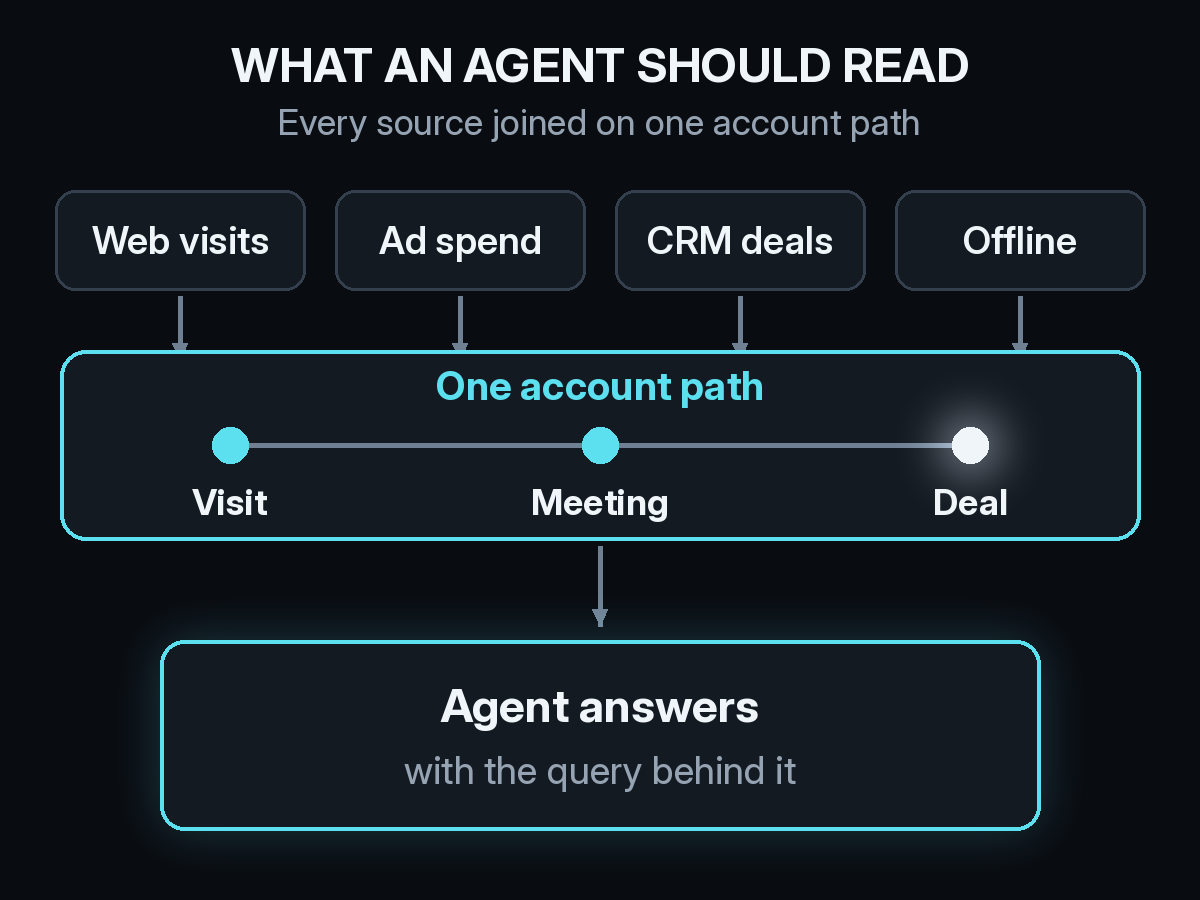
An agent needs the same thing a good analyst needs: every touch joined on one path per account, from the first visit to the closed deal. In practice that means four kinds of data.
- Web visits and pages, including visits with no UTM, such as citations from ChatGPT, Claude, Perplexity, and Gemini. Our guide to LLM attribution and why ChatGPT traffic lands in Direct explains the gap.
- Ad spend by channel and campaign, so cost sits next to outcomes instead of in a separate tab.
- CRM meetings and deals, so the agent can read past lead counts to pipeline and revenue.
- Offline and view-through touches, such as events and paid social impressions, which never show up as clicks. Our post on offline attribution for B2B shows how those get onto the path.
When all of that sits on one account path, a question like "which channels started the deals we closed last quarter?" has one answer, not three.
Why should every answer come with the query behind it?
Agents make mistakes. They misread a column, pick the wrong date range, or count contacts when you meant accounts. You cannot catch that if all you see is a sentence and a number.
The fix is to expect a checkable answer: the result, the query that produced it, and the table it came from. A marketer who does not write SQL can still see that the query covered the last 90 days, or grouped by campaign instead of channel. Someone on the data side can rerun it.
This also changes how you work with the agent. Instead of arguing with a number, you ask a follow-up in the same thread, like "now only paid search" or "split that by new and returning accounts." Each answer stays tied to the data it came from.
Where should a human stay in the loop?
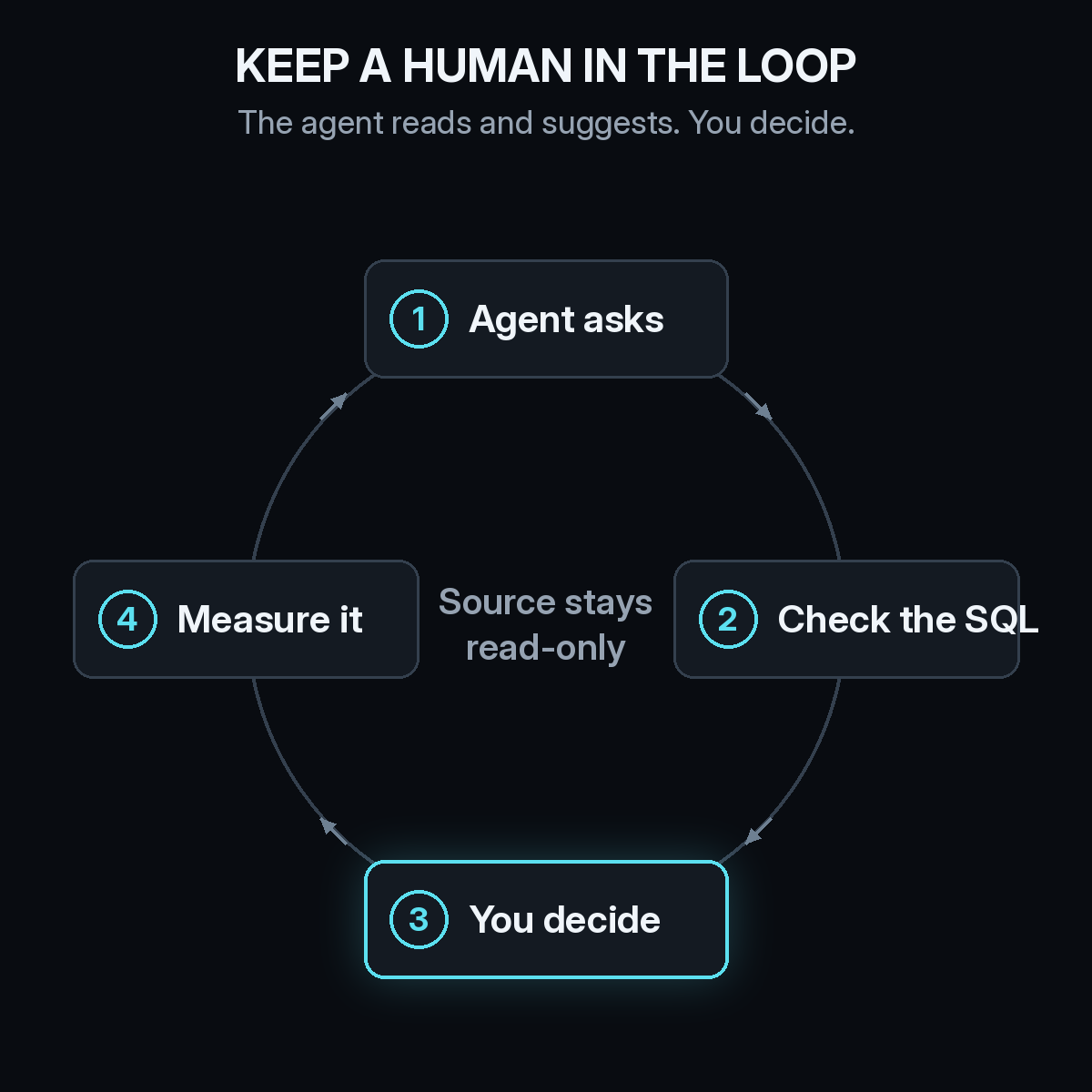
Agents are good at reading data, spotting patterns, and drafting the next step. They should not move budget on their own.
We think the right setup is simple. The attribution layer stays read-only, so an agent can query it but never change it. The agent asks the question and shows its work. A person checks the query and makes the call. Then the change is measured on the same path, so the next question starts from what actually happened.
That loop keeps agents useful without letting them act on a bad read. It also builds trust. Once a team has checked a few dozen answers and found them right, it starts acting on them faster.
Which questions are worth asking an agent first?
Start with questions where the answer would change a decision this month:
- What was our cost per conversion by channel over the last 90 days?
- Which channels started the accounts that booked meetings this quarter?
- How much pipeline came from accounts whose first visit was from an AI answer?
- Which campaigns drive signups that never reach a meeting?
Each of these needs spend, web activity, and CRM outcomes on the same path. If your agent cannot answer them, fix the data before you add more automation. Our explainer on reading CAC by channel when deals take months covers why cost questions in particular need the full path.
Do you need a data warehouse first?
No. A warehouse is one way to join these sources, but most growth teams do not have the time or headcount to build and maintain one. What matters is that the joined data exists and that an agent can reach it through a standard connection. The Model Context Protocol (MCP) gives you that: one server that works across agent clients like Claude.
Clean inputs still matter. If UTMs are inconsistent or CRM records are not tied to the right account, the agent inherits those gaps. A pass through CRM hygiene for B2B attribution is worth doing before you connect anything.
How Source gives agents attribution data
Source is the attribution data layer for your agents. You install one pixel or a Google Tag Manager tag, connect your CRM, and Source builds each account's path with no warehouse to set up. Multi-touch, view-through, offline, and LLM attribution sit on that same path, along with real CAC, goals, and channel quality.
Then connect your agent. The Source MCP server gives it read-only tools to ask questions in plain English, describe your data, run SQL, and list your websites. Answers come back with the SQL behind them, so they are easy to check. Our Source MCP launch post covers setup for each client, and if you use Claude, here is how to connect Source from Anthropic's Connectors Directory.
You can also chat with your data inside Source, get AI recommendations, and receive daily Slack reports. Source is SOC 2 Type II and ISO 27001 certified, and customer data is not used to train external models.
If you want your agents working from real attribution data, start free at dash.source.app/signup, install the pixel, then connect the agent you already use.