


How to attribute B2B pipeline to events and trade shows
Event attribution connects a trade show, conference, or field event to the pipeline and revenue it produced. Once you add the sponsorship, booth, travel, and dinners, events are often one of the largest single lines in a B2B marketing budget, and one of the hardest to defend afterward. The booth conversation happens offline, the badge list reaches the CRM days later, and by the time a deal closes the event is either missing from the path or getting credit for every account that walked past.
This guide covers the setup that makes an event report hold up: what to capture at the booth, how to get the touch onto the same path as web visits, how to separate new pipeline from deals that were already moving, and what to show finance afterward.
Decide what counts as an event touch before you go
Write the definition down before the event, while nobody has a number to protect. A badge scan from a real booth conversation is a touch. A meeting held at the event is a stronger one. Attending your session or your dinner counts too. The full attendee list the organizer sends to sponsors does not count, because registering for the same conference is not an interaction with you.
Give each type its own campaign member status, such as Scanned, Attended session, and Met. In HubSpot or Salesforce, one campaign per event with those statuses keeps every touch for that event in one place, and reps can work the list by status instead of treating every name the same way.
Capture each touch with a person, a real date, and a campaign
Each touch needs three things to be usable later: an email address that matches a Contact, the date the interaction happened, and the event campaign. The date is where most event reporting goes wrong. If the scan list is imported a week after the show and the import date becomes the touch date, the event slides later in every buyer's path. For a buyer who booked a demo the week after the show, the booth conversation now appears to come after the demo.
Name an owner for the upload and a deadline, such as two business days after the event closes. Map the event date into the campaign member or activity date field yourself instead of letting the import stamp today's date. Deduplicate against existing Contacts so a known buyer keeps their history and does not turn into a new lead with no past.
Put the event touch on the same path as web touches
A buyer who stops at your booth has usually done something online already, and will do more afterward. The event touch belongs between those visits, on the day it happened, so the path reads in order: a blog post in May, a pricing page visit, the booth conversation in June, the follow-up email click, the demo, the deal.
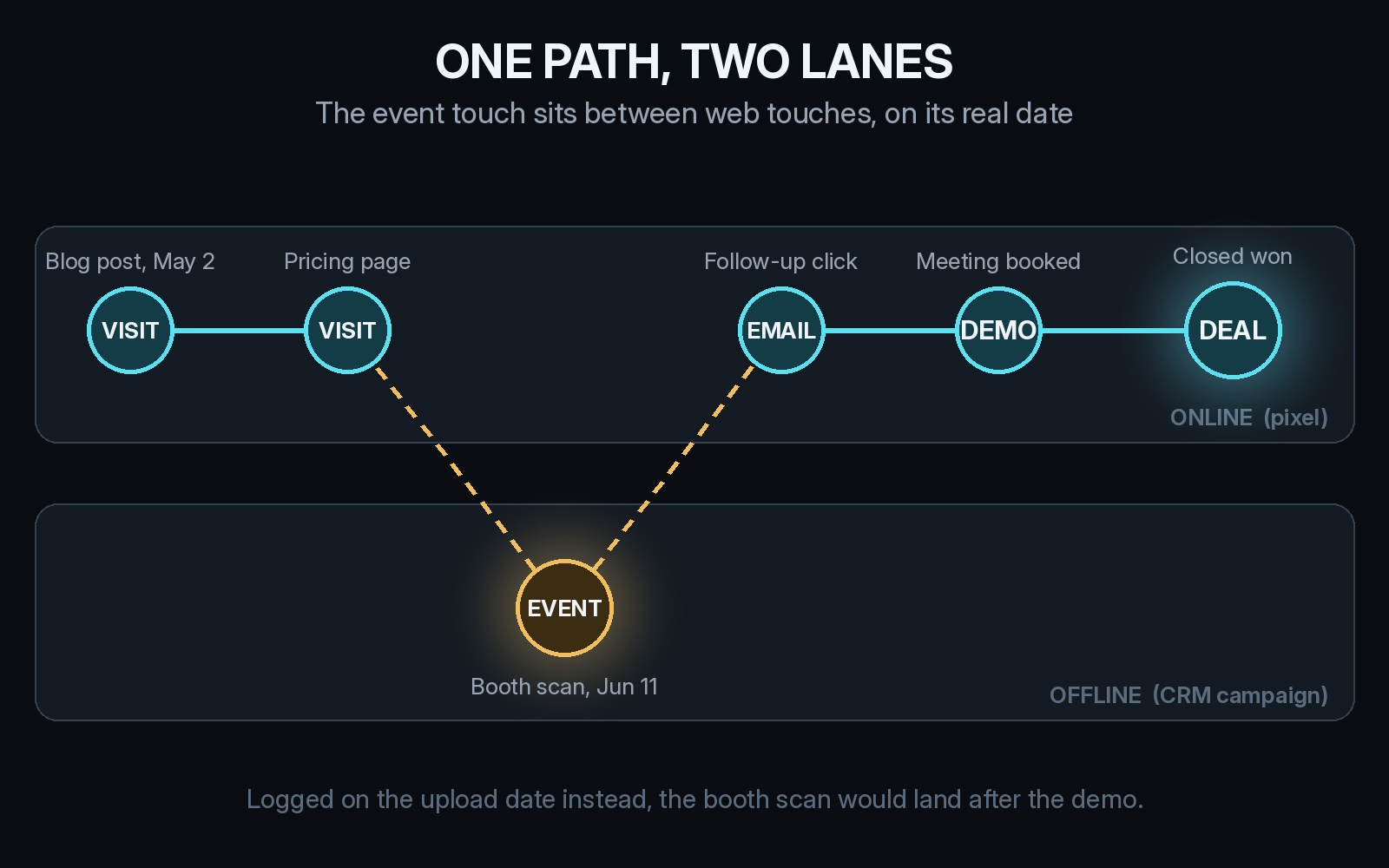
The online lane is easy to collect because your pixel sees it. The offline lane needs the CRM campaign and the real date. Our explainer on what offline attribution means in B2B covers how meetings and other off-site activity join the visit history.
Tag every link you send after the event so the next visit connects to the event instead of landing in Direct. Use one pattern everywhere, for example utm_source set to the event name and utm_medium set to event, on follow-up emails, the booth QR code, and any slide with a URL on it. UTM mistakes that send B2B deals to Direct lists the habits that break this.
Separate new pipeline from pipeline the event touched
This step decides whether anyone believes the event report. On the day of the event, every account you met falls into one of three groups. Some already had an open opportunity. Some had none and opened one inside your window. The rest had none then and still have none.
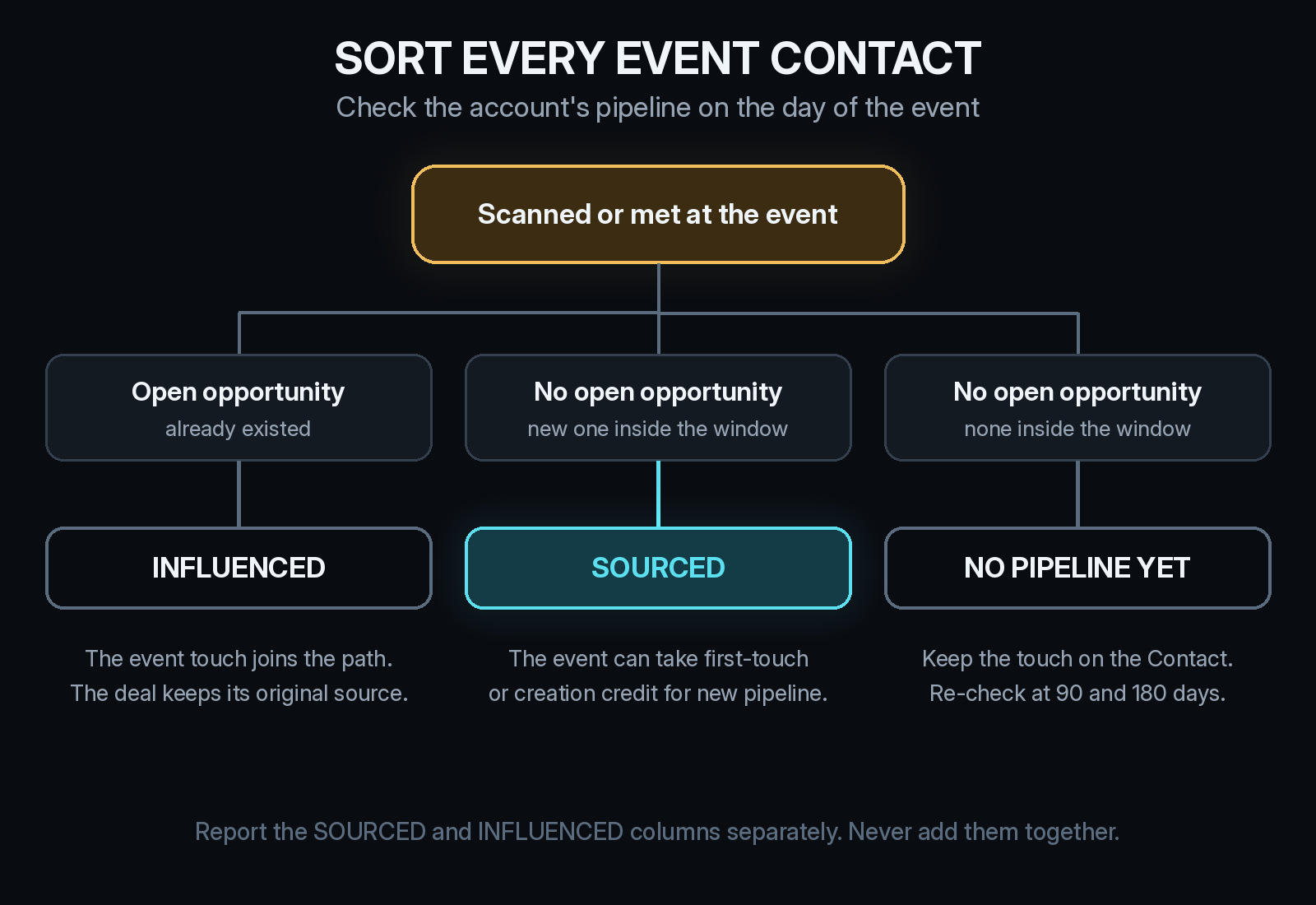
Only the second group is pipeline the event can say it created. The first group is influenced pipeline: the event touch goes on the path, and the deal keeps the source it already had. Adding the two together is how a show where the team mostly met existing customers ends up credited with their whole renewal and expansion pipeline in the recap deck.
Agree on the rule with sales before the numbers come in. If sales and marketing already argue over who sourced a deal, When sales and marketing both claim the same deal walks through writing that rule down.
Pick the window before you read the numbers
The window is how long after the event a new opportunity can still count as event-sourced. For a sales cycle of three to six months, use 90 days for opportunity creation and read closed revenue again at 180 days. Short windows undercount events when cycles are long, and very long windows let the event claim deals that started somewhere else. The attribution window, explained for long B2B sales cycles covers how to choose one for your cycle.
Use the self-reported answer as a check. When a demo form says "met your team at the booth" or names the conference, the buyer has confirmed the event touch in their own words. When the answer names something else, look at the full path before giving the event credit. Our self-reported attribution checklist covers how to collect those answers so they stay usable.
Report cost against the pipeline the event created
Use the same report for every event so shows can be compared with each other and with your other channels.
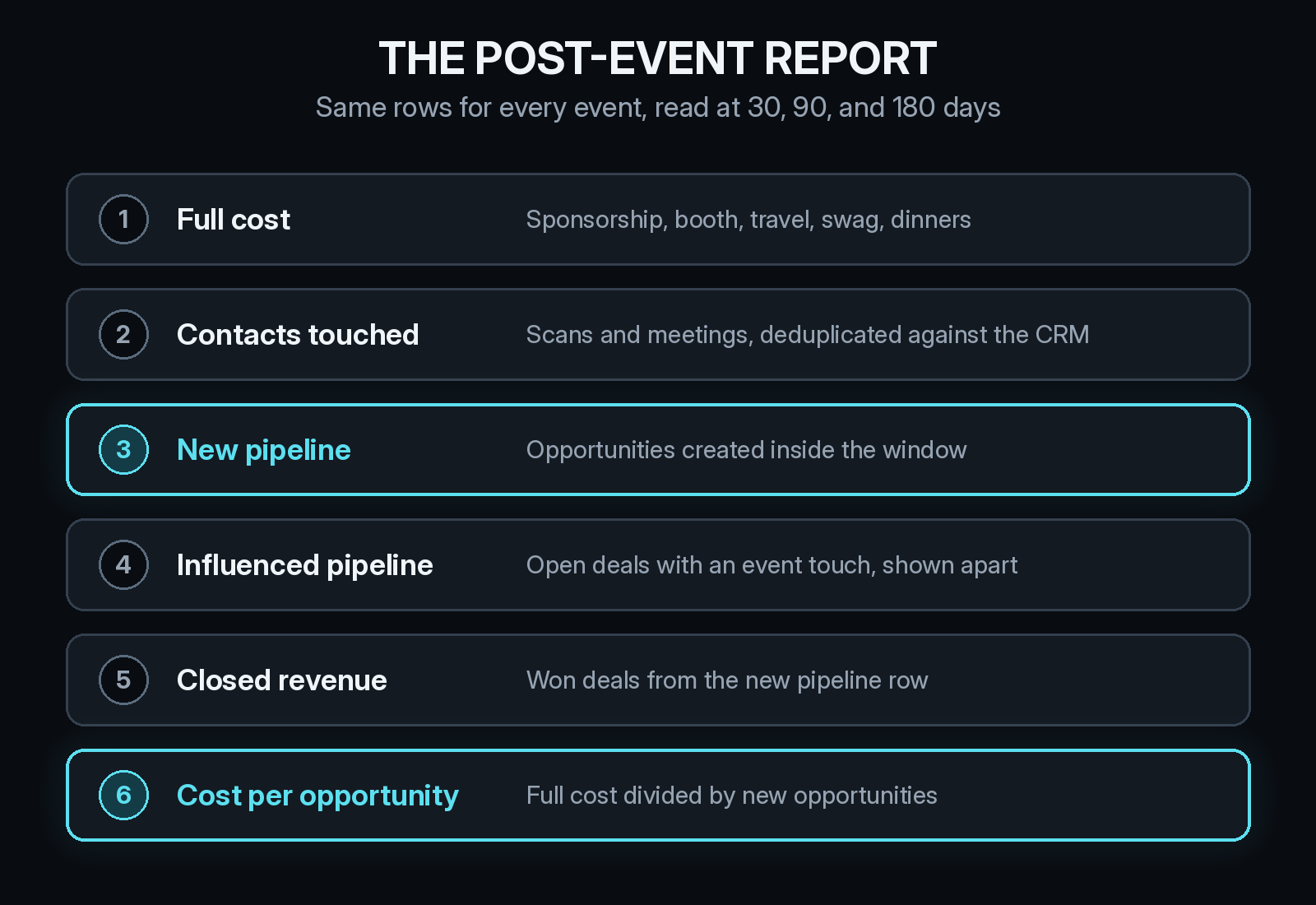
Full cost means all of it: the sponsorship fee, booth build and shipping, staff travel and hotels, swag, and any dinners or side events. Leaving out travel makes every show look cheaper than it was. Cost per new opportunity, and later cost per closed deal, are the numbers that let you put an event in the same CAC table as paid search or LinkedIn. How to read CAC by channel when B2B deals take months explains why the timing of cost and revenue matters for that comparison.
Read the report at 30 days for early signal, at 90 for pipeline, and at 180 for revenue. A show that looks thin at 30 days can look very different once larger opportunities from the booth start to close. Keep influenced pipeline on its own row so the team can see which open deals the event helped move without counting them as new.
How Source keeps event touches on the deal path
Source installs with one pixel or Google Tag Manager, with no data warehouse to build. It records each visit from the first one and supports offline attribution, so event touches can sit on the same multi-touch path as web visits, paid clicks, view-through impressions, and traffic from ChatGPT, Claude, Perplexity, and Gemini.
From there you can see real CAC by channel, set goals, and compare channel quality, events included. You can chat with your data, get AI recommendations, and receive daily Slack reports. Source is SOC 2 Type II and ISO 27001 certified, and customer data is not used to train external models.
Start free at dash.source.app/signup and have the path in place before your next show.
Install the pixel and connect your first data source in minutes. Start your free trial