


How to set up webinar attribution for B2B pipeline
Webinar attribution works when every registration and every attendance lands on the buyer's path as its own touch, with the real date, tied to the same contact and account as their web visits and deals. Most teams only see a registration count from the webinar platform and a lead source of "Webinar" in the CRM. That hides which channel filled the room, which attendees came back, and whether the session started any pipeline.
This guide walks through the setup in the order you would do it for your next session. It takes an afternoon, and most of it happens before the first invite goes out.
What does webinar attribution need to capture?
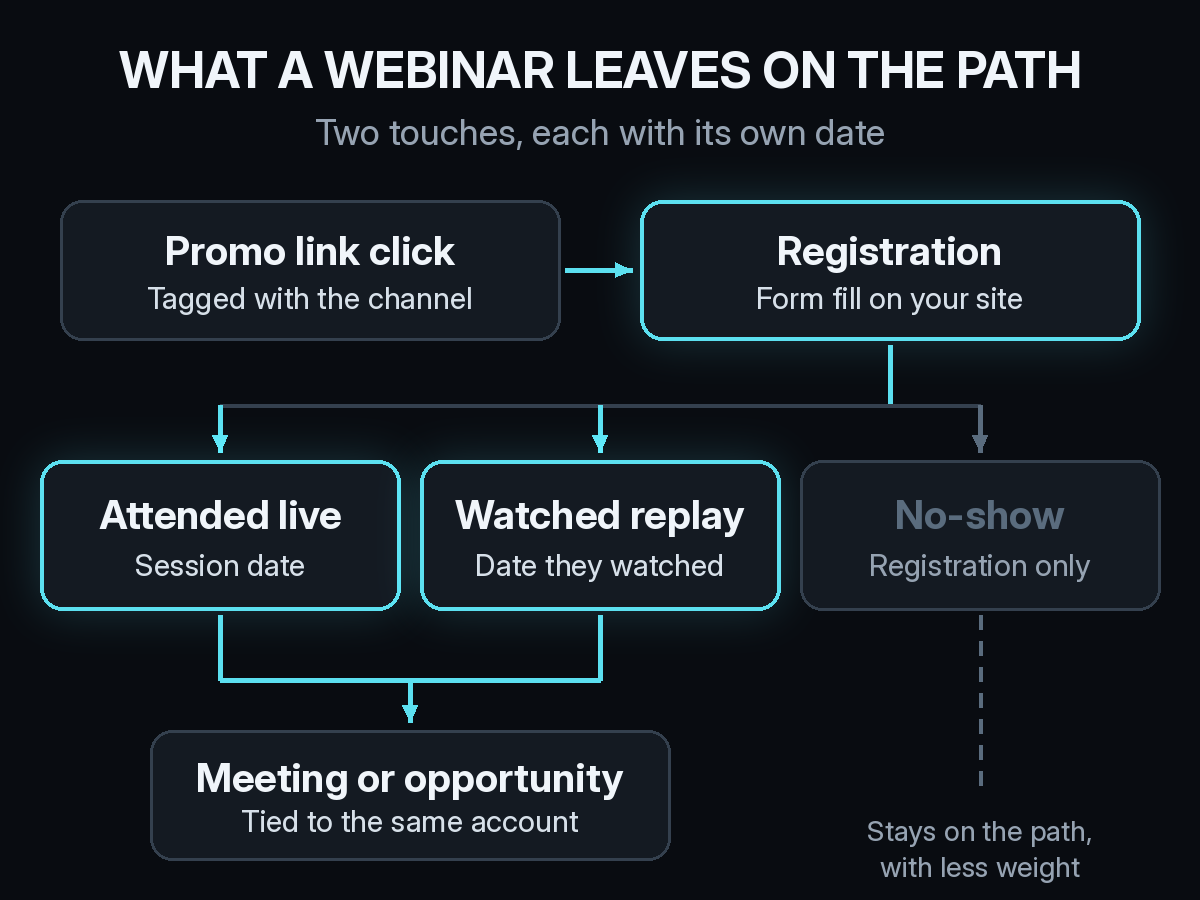
A webinar leaves two touches, and they answer different questions. The registration tells you which promotion worked: the email, the LinkedIn post, the partner newsletter, or the paid ad that got someone to sign up. The attendance tells you whether the session itself held their attention, live or on replay.
Both belong on the path. If you keep only the registration, the webinar looks like a lead form. If you keep only the attendance, the channel that filled the room gets no credit at all. No-shows still count as a registration touch, with less weight than someone who sat through 45 minutes.
How should you tag webinar promotion links?
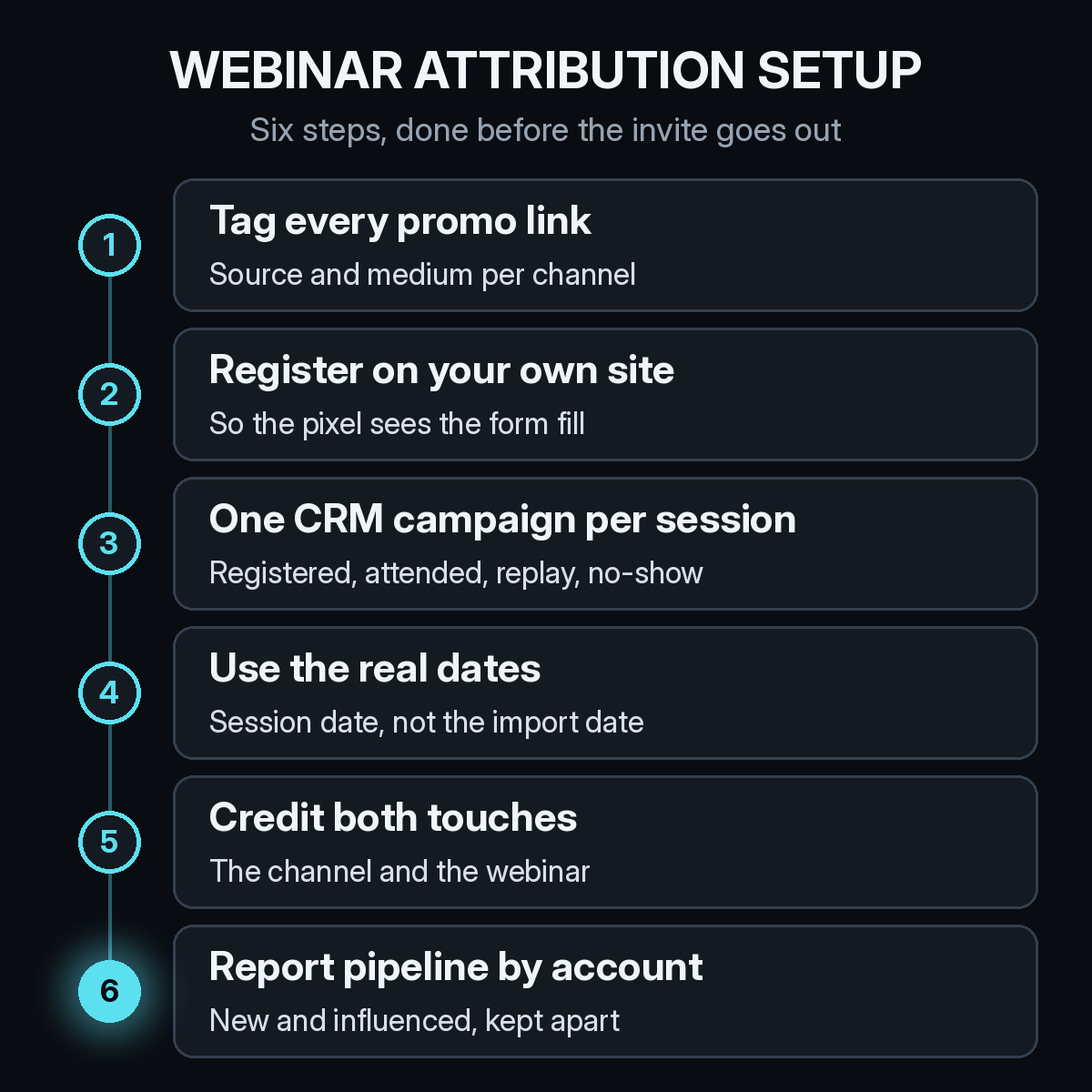
Tag every link that points to the registration page, in every channel, before anything is sent. Use utm_source and utm_medium for the channel (newsletter and email, linkedin and paid-social, a partner's name and referral) and keep utm_campaign set to the webinar name everywhere. That way each promotion rolls up to the same session, and you can still see which one did the work.
Give speakers and partners their own tagged link too. A co-host who shares an untagged URL sends their audience into Direct, and the partnership looks like it produced nothing. Our list of UTM mistakes that send B2B deals to Direct covers the naming habits that break this.
Should the registration page live on your own site?
Yes, if you can. Platforms like Zoom, ON24 and Livestorm all offer hosted registration pages, and they are easy to set up. The problem is that your tracking pixel does not run on someone else's domain, so the visit, the UTM tags, and the form fill happen out of view. You end up with a registrant list and no idea how those people found you.
Put the form on a page on your own domain, either by embedding the platform's form or by using your own form and sending registrants to the platform through its integration. The visit and the registration then sit on the same path as everything else that buyer did on your site.
How do registrants and attendees get into your CRM?
Create one campaign per session in your CRM, such as HubSpot, with a status for each outcome: Registered, Attended live, Watched replay, and No-show. Most webinar platforms can sync attendance to the CRM directly. If yours cannot, export the attendee report and import it within two business days of the session.
Dates matter more than most teams expect. Set the attendance touch to the session date, not the day the list was imported. A replay view gets the date the person actually watched. If the import date wins, the webinar can show up after the demo it helped book, and the path stops making sense. We covered the same problem for booth scans in how to attribute B2B pipeline to events and trade shows, and the fix is the same.
Match attendees to existing contacts instead of creating new leads. A customer's VP who joins a session should keep their history, and their attendance should show up on the open deal for their account.
Who gets credit for a webinar lead?
Both the promotion and the session. The channel that drove the registration earned the first touch, and the webinar earned the next one. In a multi-touch model, each gets a share of the deal, alongside the visits, emails, and meetings that came before and after.
This is where a single lead source field falls short. It forces a choice between "LinkedIn" and "Webinar," and whichever team owns the field usually wins. Our piece on why the lead source field misleads you explains the problem in more detail. A path-based view keeps both touches and lets the model split the credit.
A "How did you hear about us?" field on the registration form is worth adding as a check. When someone writes "my manager sent it" or names a podcast, you learn about a promotion your links never saw. The self-reported attribution checklist covers how to word the question so the answers stay usable.
Which webinar numbers should you report?
Registrations and attendance rate describe the session. They do not tell you whether it was worth running. Report meetings and opportunities from accounts that attended live or watched the replay, and split them into two rows: opportunities created after the session, and open deals the session touched. Adding those together is how one webinar for existing customers ends up credited with a quarter's expansion pipeline.
Pick a window before you read the numbers. For most B2B cycles, look at new opportunities 90 days after the session and read closed revenue again later. Our guide to choosing an attribution window for long B2B sales cycles covers how to set it. Put the full cost (platform fee, paid promotion, speaker fees, and team time if you track it) next to that pipeline, so webinars can sit in the same table as your other channels when you read CAC by channel.
How Source handles webinar attribution
Source installs with one pixel or Google Tag Manager, with no data warehouse to build. It records every visit with its UTM tags, so the registration page visit and the promotion behind it land on the buyer's path. Offline attribution puts attendance and replay touches on that same path, and multi-touch attribution splits deal credit between the channel that filled the room and the session itself. View-through and LLM attribution cover the touches that never leave a click.
You get real CAC, goals, and channel quality for webinars next to every other channel. You can chat with your data to ask which sessions created pipeline this quarter, get AI recommendations, and receive daily Slack reports. Source is SOC 2 Type II and ISO 27001 certified, and customer data is not used to train external models.
If your next webinar is already on the calendar, start free at dash.source.app/signup and have the path in place before the invites go out.