See What Drives Your Meetings
Cal.com powers how modern teams schedule — Source shows you why those meetings happen. With Cal.com Attribution, every booking syncs with Source’s attribution engine so you can trace the entire journey from first click to closed deal.

CAL.COM ATTRIBUTION
Your calendar is full — but which campaign put those names there? Without attribution, it’s impossible to know which ads, emails, or pages drive real opportunities. That’s where Source + Cal.com comes in:


THE INTEGRATION
The Source + Cal.com integration automatically syncs event and booking data with complete attribution details.

Capture UTM parameters, referring URLs, and campaign IDs for every booking

Sync meeting data from Cal.com into Source and your connected CRM
Attribute meetings to channels, campaigns, and keywords automatically
Build dashboards showing which efforts generate sales-ready meetings and closed-won revenue

FEATURES
Track the complete journey from marketing campaign to booked meeting to revenue.
New Cal.com bookings automatically update in Source within minutes.
Push enriched meeting attribution data into your CRM for full-funnel reporting.
Connect your Cal.com account in minutes — no developer help required.
Know exactly which marketing efforts drive meetings that turn into pipeline.
HOW IT WORKS
In Source, go to Connections → Cal.com → Connect. Sign in with your Cal.com account and approve access.
Source automatically pulls event and attendee data from Cal.com and enriches it with UTM parameters and marketing context.
See attribution data in Source, your CRM, or BI tool. Measure which campaigns create the most meetings and revenue.
FOR WHO
If your business depends on meetings, Cal.com Attribution shows what’s driving them. Use it to:


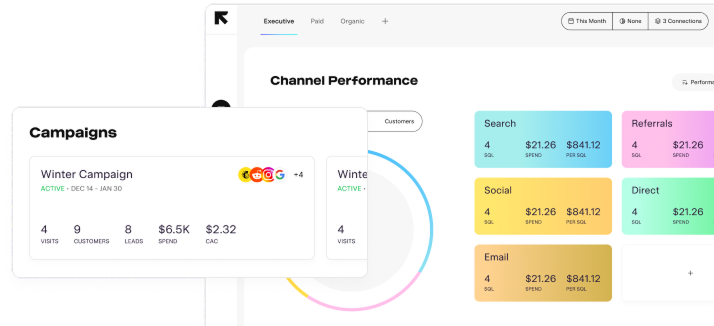
Connect Source with Cal.com and start tracking attribution instantly. Our free plan includes real-time syncs, core attribution fields, and CRM integrations to get you started quickly.
You can connect and sync in under five minutes.
Yes — Source tracks full UTM data for every Cal.com booking automatically.
Absolutely. Source integrates with HubSpot, Salesforce, Close, Zoho, and more.

