


Introducing Multi Touch Attribution in Source: First Touch, Position Based, and Time Decay Models

Source shipped a big feature that unlocks different attribution models for reporting.
Up until today
Source used First Touch attribution to calculate performance. This means when a person visits your site via social media, and then again via search to convert, then all of the credit as attributed to Social Media.
This is the best model for many use cases as your user learned about your company via Social, then used search to come back to convert. The social campaign is what influenced the customer, and search was just a means to an end. You should be spending more dollars on your Social campaign.
But what if your marketing strategy follows The Rule of 7? In this case, each touch is considered influential to the customer's ultimate conversion. So a Multi-Touch attribution model is appropriate.
How does it work?
There were two interesting challenges while building this - determining a session (the touch), and handling aggregate data where we don’t have exact attribution.
Step 1: Track Sessions
Say someone visits your site via paid channel, finds your blog interesting, and clicks through a few articles. That entire session will be attributed to the paid channel as one touch. If they close their browser and come back for a few more articles, that’s another touch.
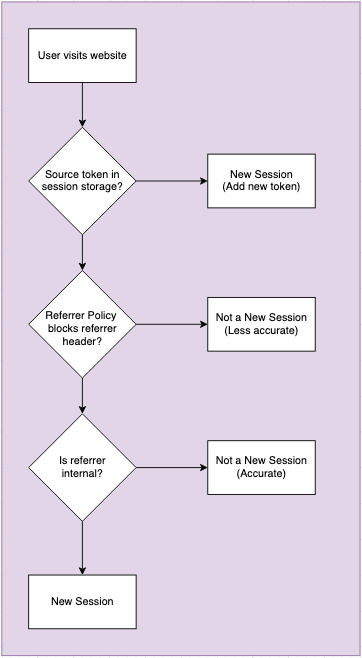
Sessions are intuitive to talk about, but there are no browser APIs available to capture, so we have to use heuristics.
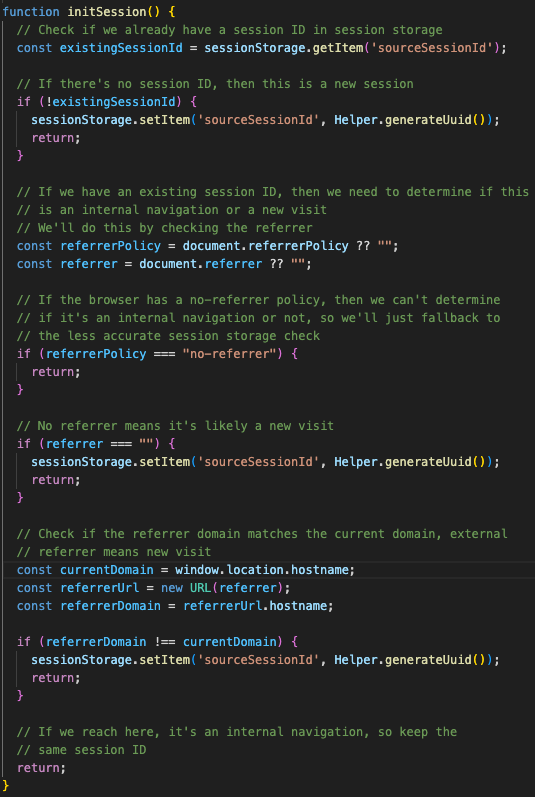
Source uses your browser’s Session storage and HTTP referrer headers to determine if a click is a new touch or part of an existing session.
New sessions get recorded with a Session ID and are what Source uses to calculate a Touch.
.
Here’s the Javascript -
Step 2: Reporting
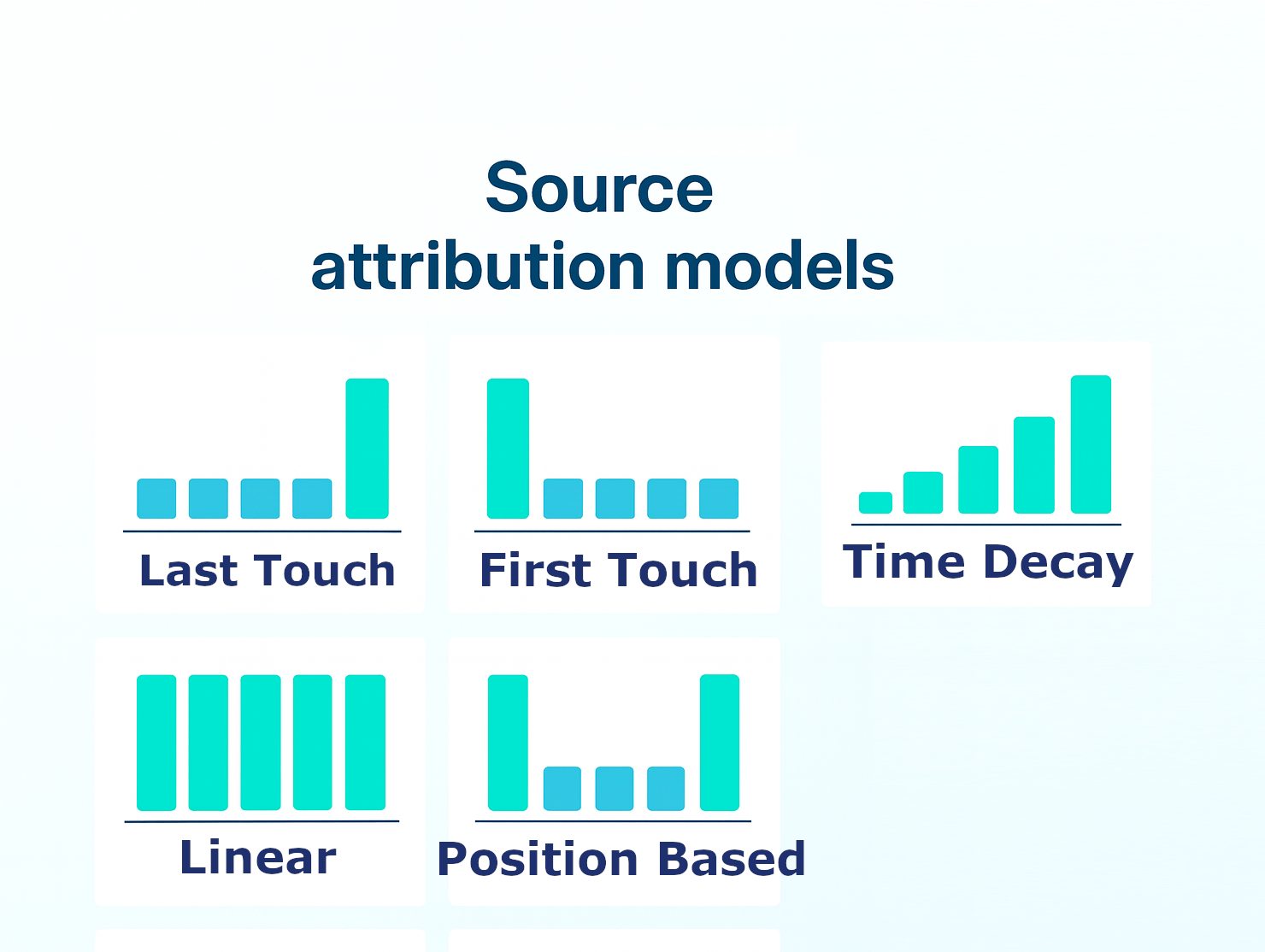
Source calculates conversion influence based on one of 5 models
First/Last Touch
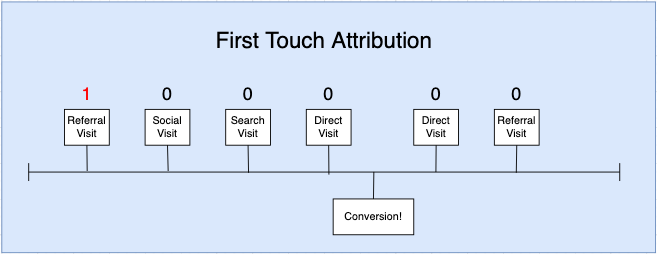
Full weight is applied to the first or last touch before the conversion. In the above example, we only credit a Referral conversion for the user.
Multi Touch
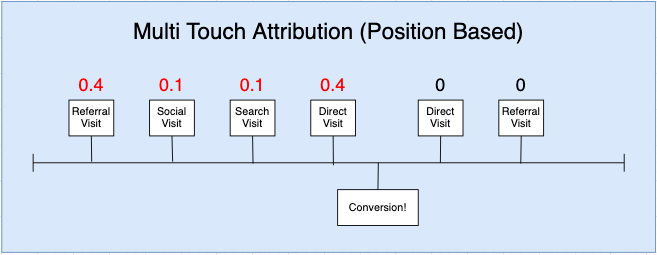
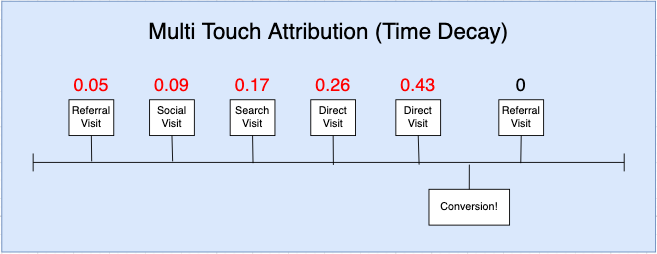
Weight is spread across all touches before a conversion. In the above examples, referral, social, search, and direct channels are all getting partial credit for the conversion.
A Position Based algorithm applies 80% of the weight to the first and last touch, then spreads the remaining weight evenly across the remaining touches.
A Time decay algorithm applies the highest weight to the most recent touch and less to previous. Source provides a linear decay model, and an exponential decay model.
Attribution Data
There are two types of attribution metrics provided by Source - pixel metrics, and source metrics.
Pixel Metrics
Pixel metrics come from the Source pixel you installed on your site, so the information is complete and Source can calculate exact numbers.
For pixel metrics, Source calculates weights directly against event data. Two touches with 0.5 weight will have an overall conversion influence of 1.
Source Metrics
Source pulls metrics from APIs via your advertising channels - Google Ads, Meta Insights, etc. These data sources come in aggregate, without specific attribution data, so Source needs to apply statistics and confidence levels to paint an accurate picture.
Using pixel data, Source knows the overall weight paid and organic channels have in each attribution model. That weight is applied to the aggregate values returned from Ad source APIs.
Extra
Statistics is also how Source is able to provide organic search results at a user level. Google Search Console provides high level time and geographic information about organic queries. Source uses that information to make an educated estimation about which query is associated with a given contact.
-
Hopefully this article give you a better understanding of how we evolved our attribution modeling. Feel free to reach out to me directly with any questions. My email is parris@source.app
All the best,
Parris Varney
Co-Founder & CTO