


Meta ads attribution for B2B: from ad view to closed deal

Meta ads attribution for B2B means connecting a Facebook or Instagram ad to the pipeline and revenue it helped create, not just the leads Meta reports. Most B2B teams judge Meta on cost per lead because that is where Meta's own reporting stops. The deal closes weeks later in the CRM, outside Meta's attribution window, and often after the buyer came back through search or a direct visit. To measure Meta properly you need three things: tracking that survives browsers, a CRM that remembers where each lead came from, and a report that follows the lead all the way to closed-won.
This guide covers why Meta looks weaker or stronger than it really is in B2B, what to set up, and how to read the numbers once they reach pipeline.
Why is Meta ads attribution hard for B2B?
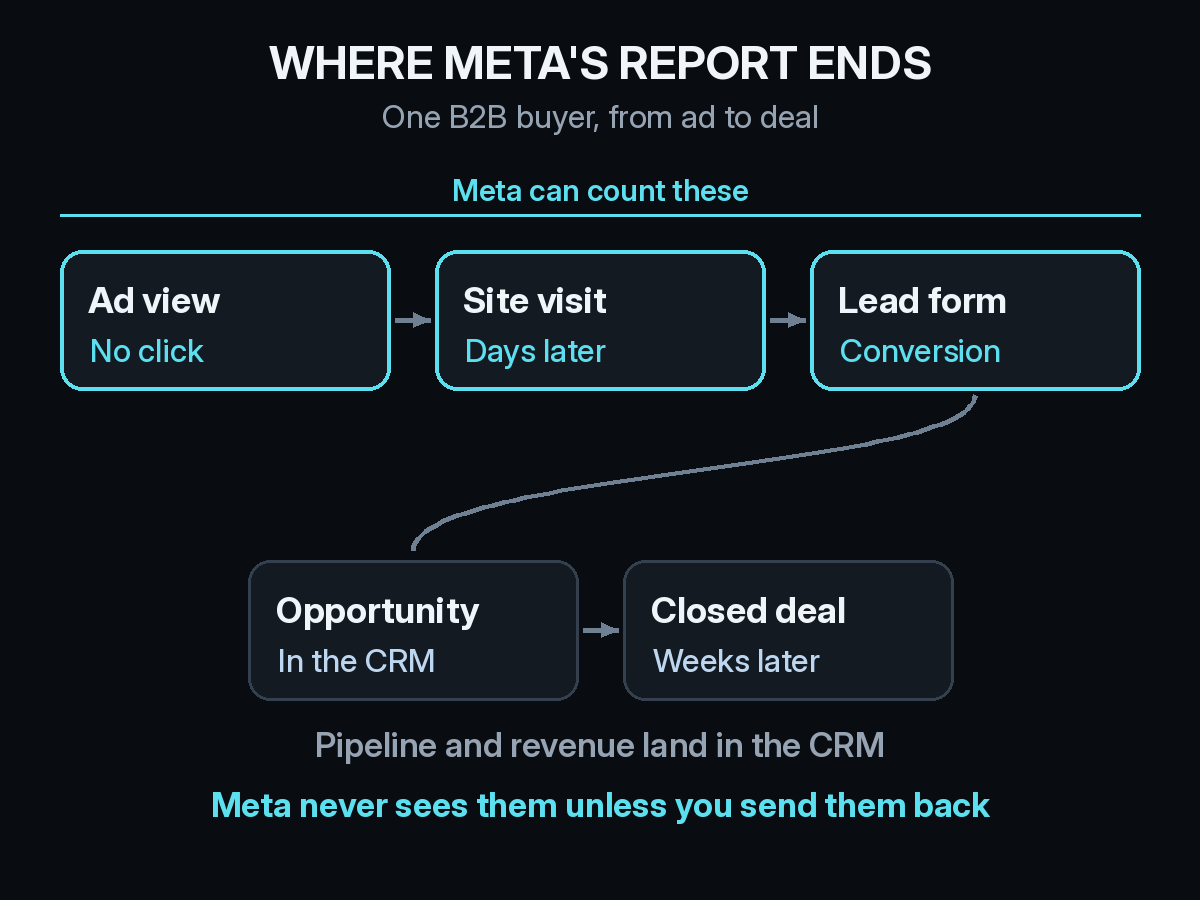
Meta was built for short purchase cycles. Someone sees an ad, taps, and buys within a day or a week. Its default attribution setting reflects that: a conversion counts if it happens within 7 days of a click or 1 day of a view. A B2B deal does not fit in that frame. A buyer might scroll past your ad on Instagram, visit your site a week later from a Google search, fill out a demo form a month after that, and sign a contract the next quarter.
That gap creates two opposite errors. Meta can overcount, because a 1-day view credit lands on people who were going to convert anyway. And your CRM can undercount, because the lead source field records the last form fill or the last click, which is almost never a social ad. We wrote more about the first problem in our guide to view-through attribution in B2B, and about picking lookback periods in how to choose an attribution window.
What does Meta actually report?
Inside Meta Ads Manager, a result is whatever event you optimized for: a page view, a lead form submit, a signup. Those numbers are useful for running the campaign. They tell you which creative and audience get attention at a reasonable cost.
They do not tell you whether those leads became opportunities, which ones closed, or what a customer from Meta really cost. Meta also models some conversions it cannot observe directly, so its count and your CRM's count will rarely match. That is normal. The fix is not to argue about which number is right, but to put both on the same deal path so you can see where they diverge.
How do you set up Meta ads tracking for B2B?
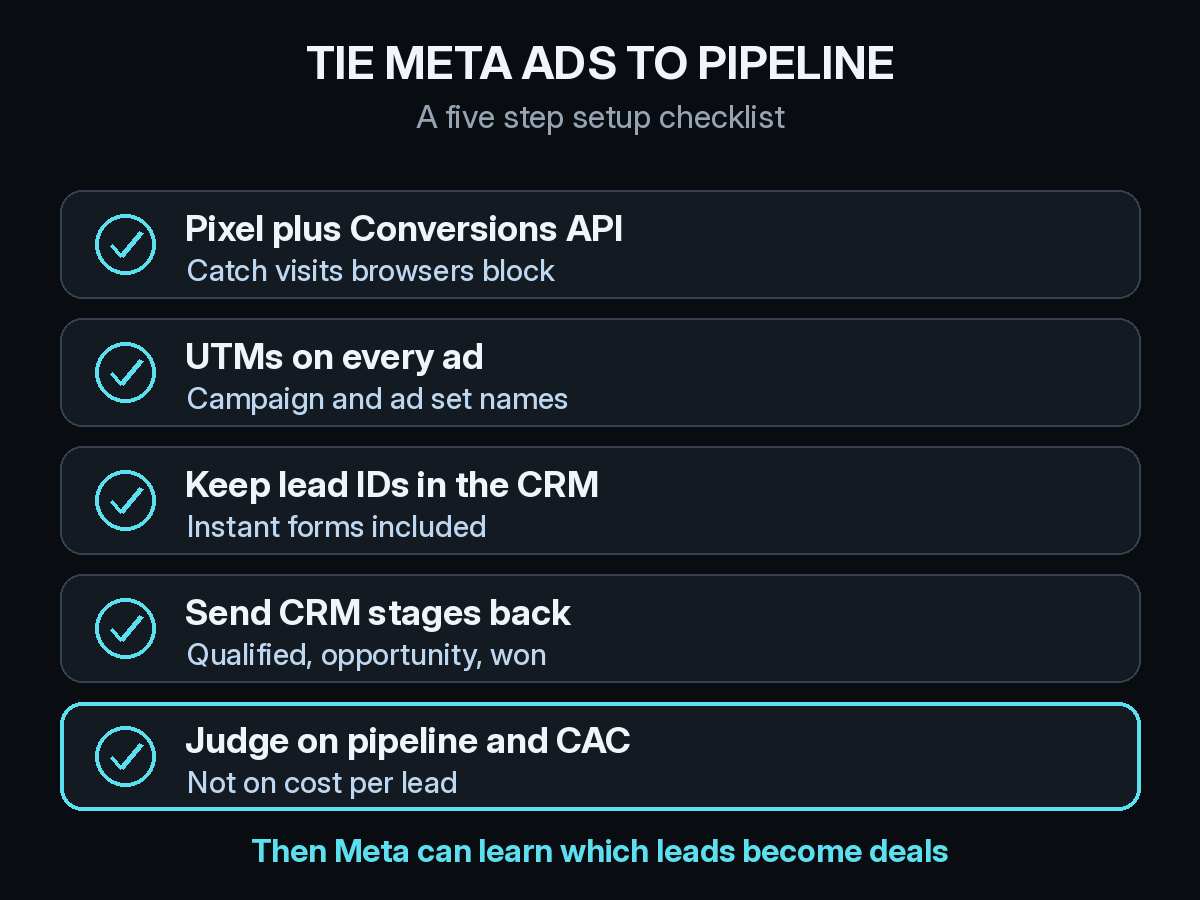
The setup is mostly plumbing, and most of it happens once.
1. Run the Meta Pixel and the Conversions API together. Browsers and ad blockers drop a share of pixel events. Meta's Conversions API sends the same events from your server, so visits and form fills still register. Deduplicate them with a shared event ID so you do not double count.
2. Put UTMs on every ad. Use consistent source, medium, and campaign values, and pass the campaign and ad set names so a visit can be tied back to a specific ad later. Small naming slips break reports months down the line. Our list of UTM mistakes in B2B attribution covers the common ones.
3. Keep the lead's origin in the CRM. Whether the lead came from your site or a Meta instant form, store the campaign, ad, and first-touch details on the contact in HubSpot or whatever CRM you use. If that information only lives in Meta, you cannot join it to revenue.
4. Send CRM stages back to Meta. Once a lead becomes qualified, turns into an opportunity, or closes, send that event back through the Conversions API. Meta can then learn which leads turn into deals instead of optimizing for whoever fills out forms most cheaply. Google Ads has the same pattern, which we walked through in sending B2B pipeline back to Google Ads.
5. Judge Meta on pipeline and CAC. Cost per lead is a campaign metric. Pipeline per dollar and CAC are the business metrics. Report both, and make budget decisions on the second.
How should you credit a view-only Meta touch?
Paid social in B2B often works without a click. People see the ad, remember the name, and search for you later. If you only count clicks, Meta looks like it does nothing. If you count every 1-day view, it looks like it does everything.
A sensible middle ground is to record views as touches on the buyer's path, give them partial credit in a multi-touch model, and check whether accounts that saw ads move to pipeline faster or more often than accounts that did not. If you want a cleaner answer on whether Meta is adding net new pipeline, run a holdout. Our step-by-step plan for geo holdout tests shows how to do that on a B2B budget.
What does good Meta reporting look like for B2B?
A useful Meta report for a B2B team answers a few plain questions each week:
- How many opportunities had a Meta touch anywhere on the path, and how many started with one?
- What is pipeline per dollar for Meta, next to LinkedIn, Google, and organic?
- Which campaigns produce leads that become opportunities, and which produce leads that stall?
- What is the real CAC for customers who touched Meta, once the deal closes?
Those questions put Meta on the same footing as every other channel. We explain how to calculate the last one in our guide to CAC by channel, and the same approach applies to LinkedIn ads attribution if you run both.
Where do AI search and other touches fit in?
Meta rarely closes a B2B deal alone. A buyer who saw your Instagram ad might later ask ChatGPT or Perplexity for tools in your category, click through from the answer, and then book a demo from a branded search. If your reporting cannot see the LLM referral or the view, the deal gets credited to brand search, and Meta and AI search both look worse than they are. Tracking these touches together is what keeps channel comparisons honest.
How Source measures Meta ads for B2B
Source puts every touch on one path from first visit to closed deal. You install one pixel, or add it through Google Tag Manager, connect your ad accounts and CRM, and there is no warehouse to build. Source records multi-touch, view-through, offline, and LLM attribution for ChatGPT, Claude, Perplexity, and Gemini, so a Meta view and an AI search visit both show up on the same deal.
From there you get real CAC by channel, goals, and channel quality. You can chat with your data, get AI recommendations on where to move budget, and receive a daily report in Slack. Source is SOC 2 Type II and ISO 27001 certified, and customer data is not used to train external models.
If you want to see what your Meta spend is really producing in pipeline, sign up for Source and connect your accounts, or learn more at source.app.